Keep supplier records recognizable
A supplier list helps a shop connect purchase activity to the businesses that deliver its goods. The suppliers screen in DaDy POS is a place to organize those records. Use names that correspond to the invoices and delivery paperwork the owner actually sees. If a business operates under a trading name that differs from an individual contact’s name, keep the distinction clear so staff can identify the right record without exposing unnecessary personal details. Practical supplier management for small shops starts with current contacts and a clear purchasing history.
Collect only useful contact details
Contact details should help authorized staff place orders or resolve delivery questions. Decide what information the shop needs, who may see it, and how updates are checked. A phone number copied from an old note can be outdated or belong to a different person. Confirm important contact information with the supplier, and avoid recording private details unrelated to the business relationship.
Connect supplier records to incoming goods
When a delivery arrives, identify the supplier from the paperwork and match the delivered items before entering a purchase. The supplier record gives context; it does not verify that the goods or invoice are correct. Check product names, quantities, and pack sizes against what actually arrived. If the supplier sent a substitution or shortage, note it rather than treating the order as complete.
Understand the difference between supplier and supplier credit
A supplier profile identifies the business. Supplier-credit records concern amounts or activity the shop may need to follow up. Neither one alone tells the complete story of an invoice, delivery, return, and payment. Ask how the records connect in DaDy POS and what the shop must record separately. A listed contact does not mean the supplier has an outstanding balance, and a credit figure should be checked against supporting paperwork.
Manage returns and unresolved orders
A supplier may deliver damaged goods, an incomplete order, or an unexpected item. Keep a note of the issue on the day it is noticed and agree who will contact the supplier. If goods are returned, record that event through the purchase-return workflow and retain the supplier’s response. Do not erase the original purchase to make the records appear simpler; the timeline is useful when checking what was ordered and received.
Set expectations for ordering and communication
Use the supplier list as a reference, not as a purchasing recommendation. The owner decides what to order based on demand, shelf space, cash flow, and the supplier’s actual terms. Establish who may place an order and how a verbal arrangement is recorded. If several family members or employees call suppliers, a shared handover note can reduce duplicated orders and conflicting price expectations.
Review the supplier list periodically
An occasional tidy-up can identify duplicate names or details that no longer help staff. Check related purchases and credit records before making changes. Inactive supplier records may still relate to historical transactions, so do not delete them just to shorten a list without understanding the effect. Ask the provider how to preserve history while making an old supplier less prominent if that is needed.
Prepare useful questions for a demonstration
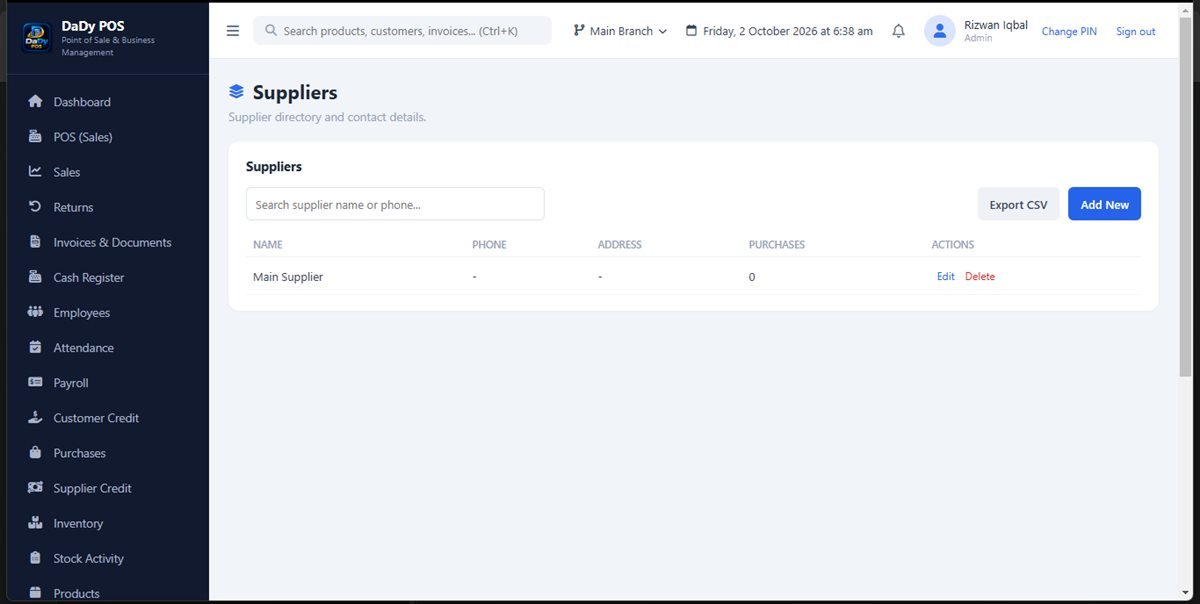
Ask the provider to show creating a supplier, finding that supplier during purchase entry, reviewing its prior purchases, and following a return or credit balance. Use a real supplier invoice with private details removed if appropriate. Confirm what is stored, how access is managed, and what the monthly charge includes. The screenshot illustrates the suppliers area, not every field or process in the application.
Make supplier handovers practical
When one employee speaks with a supplier and another receives the delivery, pass on the key details: what was ordered, expected arrival, and any agreed substitution or price question. Keep the note in the shop's approved place. This prevents two people from placing the same order or accepting different terms without realizing it.
Separate contact changes from business identity
A new delivery driver or salesperson does not necessarily mean a new supplier. Confirm whether the business itself has changed before adding a record. If the supplier has a new branch or legal trading name, ask the owner how prior purchases should remain traceable. Clear identity supports later conversations about bills and returns.
Review your active supplier relationships
From time to time, check which suppliers the shop actually orders from and whether the staff can identify the right record. An old supplier can remain in transaction history even if the shop no longer buys from them. Preserve that history while making current contacts easy to find, and ask the provider how inactive records should be handled.
Make supplier identity easy to confirm on paperwork
Use invoices and delivery notes to confirm that the supplier entry selected in the system is the business that actually supplied the goods. Similar trading names or a new contact can cause a purchase to be linked incorrectly. If a document uses a different name, ask the owner to establish whether it is a new business, a branch, or simply a different description for an existing relationship. Keep the evidence that explains the choice with the purchase paperwork. This simple check helps avoid divided supplier histories and makes it easier to follow up a return or payment. Do not infer a legal business relationship from a familiar phone contact alone.