
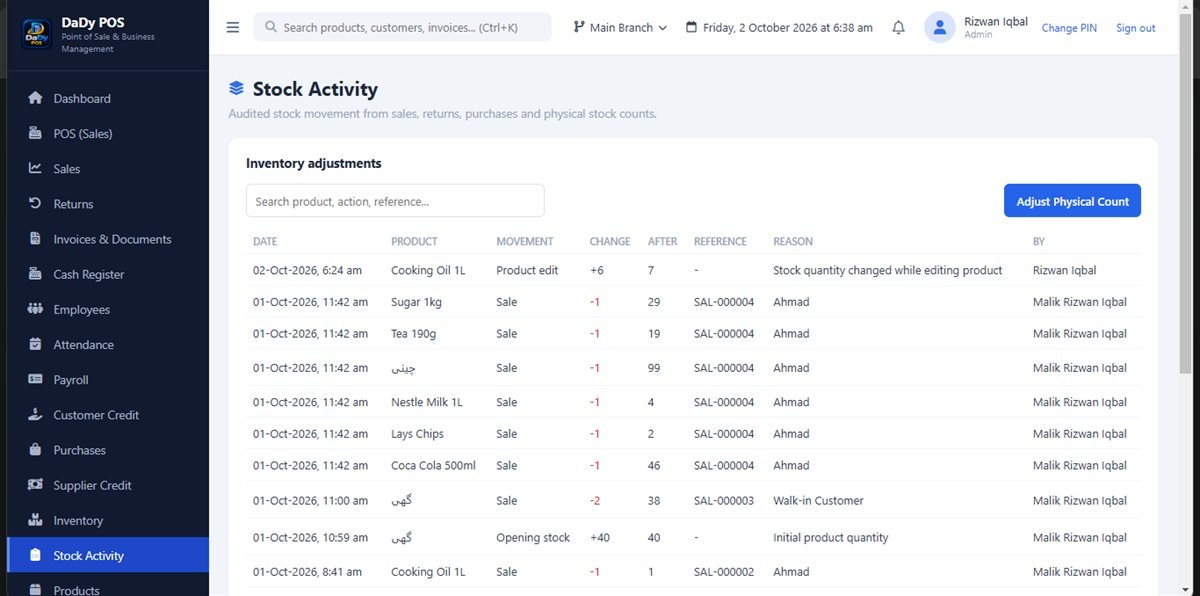
An adjustment should explain a verified difference
A stock adjustment is a correction to a recorded quantity after the shop has checked what is physically present and investigated the discrepancy. It is not a convenient way to make a report look right. DaDy POS has a stock-adjustment screen; ask the provider to demonstrate the available fields and review process in your installation. The screen can record an action, but it cannot decide whether a count is correct or whether an adjustment has a sound reason. Documenting shop inventory stock adjustments with a reason keeps each correction explainable later.
Investigate recent stock movements
Review recent sales, purchases, customer returns, purchase returns, and prior adjustments for the product. A delayed entry or duplicated purchase may explain the difference without any unrecorded physical loss. Ask staff who handled the item and whether it moved between storage and the counter. Do not accuse anyone based on a mismatch alone; first establish what records and physical locations were included in the count.
Record the reason in plain language
If the shop decides to make an adjustment, the reason should be specific enough that a future reviewer understands the decision. Follow the controls available in DaDy POS and include a concise factual description where the workflow allows. Avoid unsupported explanations such as theft or damage unless the shop has verified that conclusion. A neutral note about a recount or discovered breakage is more honest than speculation.
Do not use adjustments instead of purchase or return records
Goods arriving from a supplier belong in a purchase workflow; goods going back to a supplier belong in a purchase return. Customer returns also have their own record. An adjustment should not be used to hide a missing purchase, an incomplete delivery, or a customer event. Keeping the transaction types distinct makes the shop’s history easier to follow and preserves useful context for later review.
Use a consistent physical-count method
Count at a quiet time and define exactly which shelf or storage area is included. Pause movements during the check when practical, or agree how staff will record items taken or received while counting. Write down the count and date before comparing it with the POS figure. For products that are easily confused, separate variants and verify packaging rather than estimating from a distance.
Review recurring patterns with staff
Several adjustments for the same item may signal a confusing name, a shelf process problem, an unrecorded use, or an inaccurate delivery check. Compare dates and reasons, then ask the employees involved what they observe. The purpose is to improve the routine, not to turn an exception log into a tool for blame. Consider whether categories, product labels, or receiving steps need clarification.
Keep an adjustment trail understandable
A future owner or colleague should be able to see what was counted, when, and why a change was made. If the software offers a history or review path, ask how to find it. Retain any supporting notes or source information according to your shop’s normal record practice. Avoid changing several products in one batch without a way to tell which observations support each change.
Ask for a demonstration before buying
Have the provider show a realistic discrepancy: count a product, review recent activity, enter an adjustment, and find the saved record afterward. Ask which types of stock events should use another screen and what information can be retained. The stated DaDy POS price is Rs 12,500 plus Rs 1,000 monthly. Confirm what the monthly fee covers and how the shop’s product units will be configured.
Do not adjust stock while the count is still moving
If goods are being sold, unpacked, or shifted during a count, pause or record those movements so the comparison remains meaningful. Tell colleagues which shelf or product is being counted. A count completed during a busy rush may be less reliable than a short, controlled check later.
Distinguish damaged goods from missing goods
A damaged product may still be physically present even though it should not be sold. A missing unit is a different observation. Record what the count actually found, then decide how to handle damaged items under the shop's routine. Do not use one vague adjustment reason for both situations.
Review the correction after it is entered
Once an adjustment has been recorded, revisit the product in inventory and confirm that the displayed quantity reflects the intended correction. Check the saved adjustment detail if available. If the number is still wrong, pause before adding another change; the first entry, unit, or selected product may need investigation.
Treat repeated adjustments as a process clue
If the same product needs correction repeatedly, pause and ask what the pattern says about the shop's routine. The cause might be a confusing variant, goods sold in an unfamiliar unit, a receiving step that is skipped, or a location omitted from counts. Compare the adjustment notes with purchases and sales, then talk with the people who handle the item. Do not presume an employee caused the difference or keep adjusting the number without investigating. A better product label, a clearer handover, or a more consistent count may solve the underlying issue. Keep the owner informed about the change so future checks can show whether the new routine helped.