
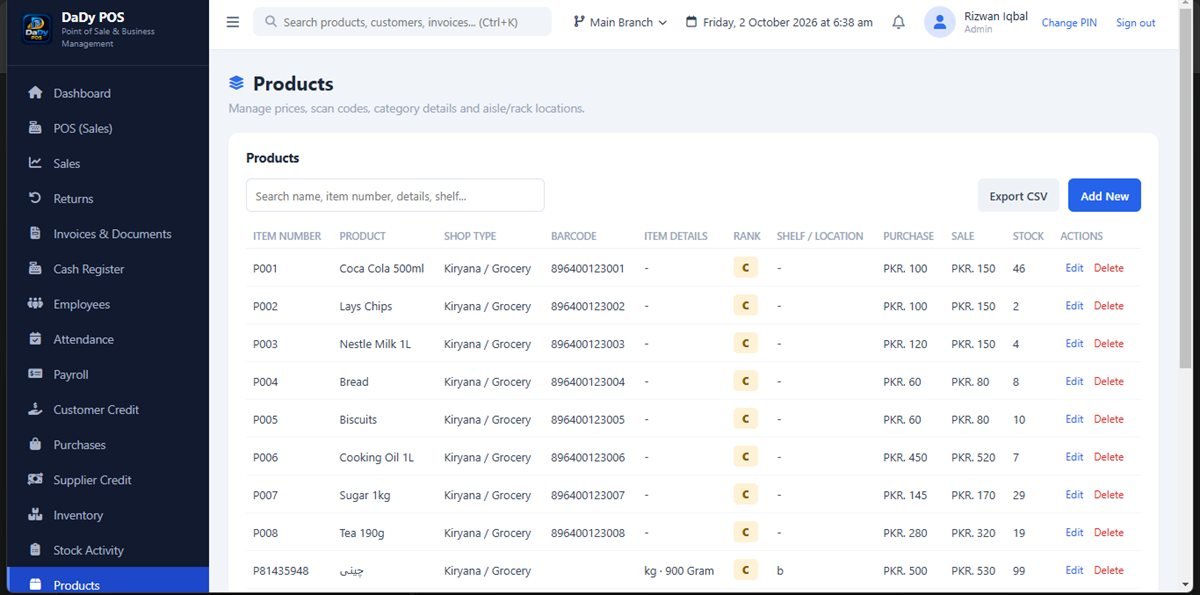
Treat every product record as a label your team must understand
A product list is more than a catalogue; it is a shared vocabulary for the owner and anyone serving customers. The products screen in DaDy POS is the place to manage records for the goods a shop sells. Start with names that make a product easy to distinguish at the counter. A name such as a familiar brand plus size or variant is usually more useful than an internal code only the owner recognizes. Before importing or entering a long list, decide how staff will search and what details will help them select the correct item. Shop product management software works best when each listing uses names and details the team can understand.
Build categories around the way your shop works
Categories help make a long product list easier to scan, but more categories are not automatically better. Group goods in a way that matches how staff and owner talk about the shop: by a sensible product family, shelf area, or other stable distinction. The categories screen is separate, so decide the structure before creating dozens of overlapping labels. If two groups mean the same thing to the people who use them, simplify the choice rather than making the screen harder to navigate.
Enter only information you can keep current
Product records are valuable when the details are accurate and maintained. Decide who may add or edit products, and ask how the screen expects information to be entered. If the shop tracks product cost or price, verify the value from a reliable source rather than guessing. When a supplier changes a price, use a deliberate update process so the old and new details do not become confused. The system can store what a user enters; it cannot verify that a label matches the goods on the shelf.
Connect products to inventory checks
A well-organized list makes inventory review more practical, but a product record is not the same as a physical stock count. Inventory depends on accurately recorded purchases, sales, returns, and adjustments. When a shelf count differs from what the system shows, record the discrepancy and investigate it; do not simply alter a product description or make an unexplained stock correction. Look for similar product variants, delayed purchase entries, and returns that may not have been put back into sellable condition.
Make the list useful for purchases and sales
Product organization helps both ends of a stock cycle: staff can select the right item during a sale, and the person recording a supplier purchase can identify what arrived. Before an order, compare the item descriptions with supplier packaging and the shop’s preferred naming. When goods arrive in different pack sizes, check with the provider how the software handles the units your shop uses. Do not assume that a box, carton, and single unit will automatically reconcile unless that exact behavior has been demonstrated.
Keep changes understandable for staff
A small product-list change can affect everyone using the counter. Tell the team when names or categories change and explain how to find the same goods afterward. If employees are allowed to add products, set a short rule: search first, follow the agreed naming pattern, and ask the owner about uncertain variants. This prevents one commonly used item from appearing under multiple spellings. Periodically review obvious duplicates and inactive entries, but check related transactions before making changes.
Plan a sensible first setup
Before entering a large catalogue, gather the information you already trust: product names, meaningful variants, and the categories staff actually use. Start with a manageable sample across different shelves, practise finding those entries from the sales and purchase workflows, and adjust your naming rules if people hesitate. Only then expand to the rest of the range. A gradual setup reveals confusing labels before they have been copied throughout a large list.
Start with the items people ask for most
When building a first product list, start with the products that appear in ordinary daily sales and purchases. This small working set lets staff practise finding familiar goods before the catalogue becomes large. Include items with a few common variants so you can test whether the naming convention really distinguishes them. After the team can find those records confidently, continue in manageable batches rather than trying to finish the whole shop in one rushed sitting.
Consider who maintains changing details
Product information changes as suppliers revise packaging or the shop chooses to stop carrying an item. Assign responsibility for keeping the list accurate and make sure staff know how to report a mismatch. An employee should not have to guess whether an unfamiliar product is already listed or whether the owner has approved a new variant. A simple query-and-review habit prevents the catalogue from growing through unnecessary duplicates.
Test the catalogue in a realistic shift
A list that looks neat on a computer may still be awkward during a customer interaction. Ask someone who did not build it to locate several products under ordinary counter conditions. Notice where they hesitate, what search terms they try, and whether similar variants are distinguishable. Use that feedback to refine names or categories before the rest of the shop relies on the catalogue.
Make product names work for the whole team
The owner may remember a supplier's shorthand, but a seasonal helper or family member may not. Let the people who actually select products test names, and ask them to point out labels that could be confused. Use a consistent way to show the distinction, such as the pack size or variant, without stuffing a name with promotional wording that is not part of the product identity. When a product changes package, confirm whether it is still the same item for your shop's records or a genuinely different variant. Ask the provider how to preserve prior activity if a record needs to change. Staff clarity at the counter can make later returns and stock checks much easier.