
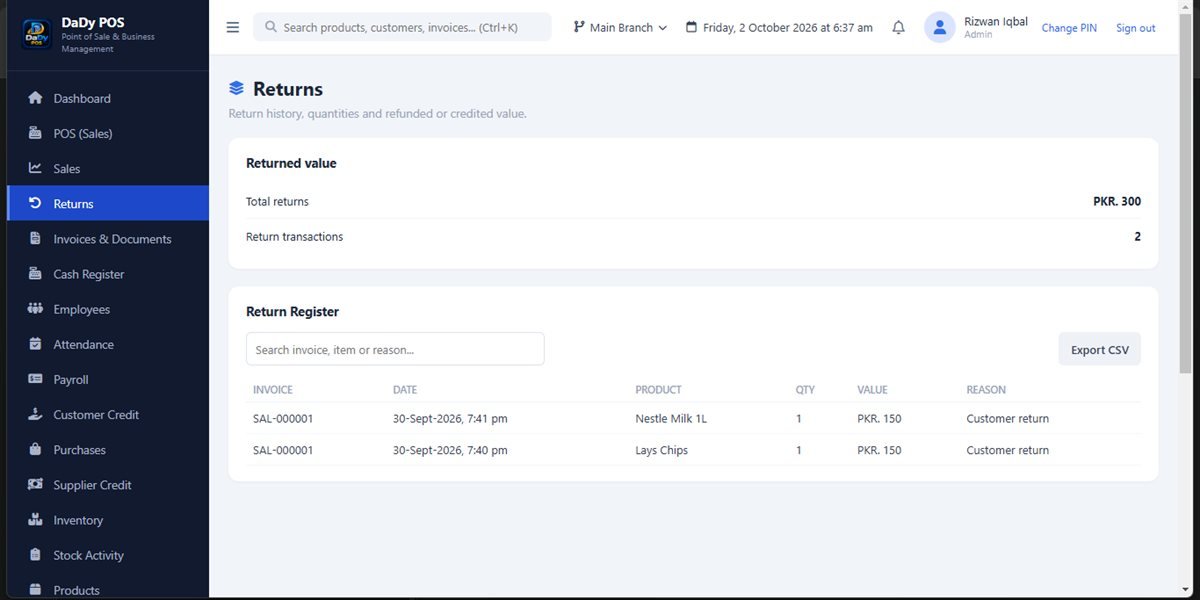
A return deserves a record of its own
A return is a later event connected to an earlier sale. It should not be hidden by deleting the original transaction or entering a new sale with an unexplained negative amount. DaDy POS has a sales-return screen, giving the shop a distinct place to handle this work. Ask the provider to demonstrate the return process using a realistic example from your counter before you depend on it. Find out what information links the return to the original sale and what details remain available for later review. Clear shop sales return records help distinguish returned goods from a new counter sale.
Check what came back before changing stock
Inspect the item and confirm its identity before treating it as inventory available for another customer. A sealed, unused product and a damaged or opened item may need different handling. Keep goods that require inspection separate from saleable stock while the owner decides what to do. If the return is accepted but the product cannot be resold, ask how the shop should represent that in its stock routine rather than automatically putting the item back on the shelf.
Find the original transaction where possible
When a customer has a receipt or clear transaction detail, use it to identify the original sale before recording a return. This reduces the risk of connecting the event to the wrong item or customer. If the customer cannot provide a receipt, follow the shop’s own policy and ask the owner how the case should be handled. Do not invent a transaction reference or customer identity simply to fill a field.
Explain the outcome and retain the context
Customers appreciate a calm explanation of what the shop can do. Tell them whether the item is being accepted, held for checking, exchanged, or otherwise handled under the shop’s policy. Make sure the record corresponds to the outcome that actually occurred, not to an arrangement that is still only being discussed. If the issue is unresolved, note it in the shop’s normal handover process and avoid recording a completed outcome prematurely.
Review effects on customer credit carefully
If the original sale involved customer credit, ask how a return affects that customer’s balance in your DaDy POS setup. The customer-credit screen and sales-return screen address connected but distinct work. Do not settle or alter a balance by guesswork. Compare the original transaction, return record, and current account details, and involve the owner where a partial payment or multiple purchases complicate the picture.
Learn from repeated return reasons
A single return is a customer-service event; repeated reasons may suggest a product description, shelf label, or counter-selection habit needs attention. Periodically review return records and look for practical patterns without blaming staff or customers from one example. Perhaps two sizes are easy to confuse, or a particular product is frequently mistaken for another. Improving product names and category organization can prevent avoidable errors.
Demonstrate the workflow before a busy day
Train counter staff on where a return belongs, who approves an exception, and how to treat the physical item while it is being checked. Practise one ordinary case and one uncertain case. Make sure employees know not to edit the original sale or use an expense entry to represent a customer return. A short, agreed process helps the shop respond consistently, even when the owner is away.
Apply the same policy from one customer to another
A return policy is easier to explain when staff know the same basic rules and when exceptions go to the owner. Write down the shop's actual policy in clear language and make sure it reflects what the business is willing to honor. The POS can keep a record of the event, but it cannot make a policy fair or consistent on its own. Avoid making a promise at the counter that a colleague later has to retract.
Check whether the returned item is complete
Some products have packaging, accessories, or identifying labels that help the shop decide whether they can be resold or need supplier follow-up. Inspect what came back and compare it with the shop's policy. Do not assume every returned item is in the same condition as when sold. Set aside goods that need an owner decision instead of mixing them with sellable stock.
Make a private correction conversation easier
If a customer believes the wrong item or amount was recorded, listen before editing anything. Find the original sale and compare it with the receipt or other available evidence. If the record needs correction, involve the owner and use the supported process. A calm explanation and a factual record are more likely to resolve a disagreement than a quick adjustment with no note.
Keep the original sale available during follow-up
When a return is questioned later, staff should be able to find the original sale and understand how the return was handled. Keep any receipt or transaction reference according to the shop's routine, and avoid editing the original record to erase the relationship. If the customer received a different resolution after the initial conversation, document the final outcome through the demonstrated workflow. A clear sequence helps another shift answer questions consistently and supports an inventory check if the item was returned to stock. The owner should decide what documents are retained and for how long; ask a qualified advisor about formal retention duties rather than assuming a POS record is the only requirement.