
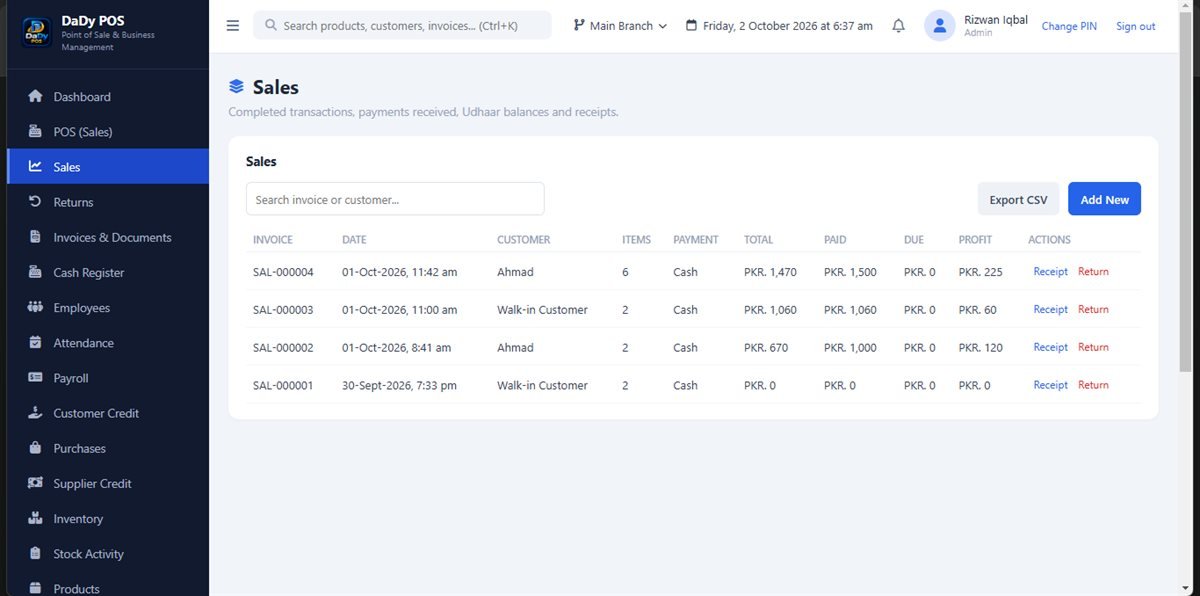
Make the sale record tell a clear story
A sales screen is where a routine counter exchange becomes a record you can revisit. The screenshot represents the DaDy POS sales area; before relying on any workflow, ask to see a real example using the products and counter habits in your shop. A useful record should make sense to the person who enters it and to the owner who checks it later. Pause long enough to confirm the products and quantities being recorded, especially when a customer combines several small items or asks for a correction while the queue is moving. A POS sales screen for shops should make each completed counter exchange straightforward to record and revisit.
Build a pace that works at the counter
The busiest moments are when shortcuts and interruptions make mistakes more likely. Keep commonly sold products easy for staff to identify in the product list, and agree on a simple way to handle a customer who changes their mind before the sale is complete. If a price or item looks unfamiliar, take a moment to verify it instead of guessing under pressure. A few seconds spent checking an entry can save a longer conversation later when the closing totals do not match expectations.
Treat a return as its own event
A customer bringing something back is not the same event as a new sale. Use the sales-return screen for a return and follow the process demonstrated for your installation. This distinction helps keep the original sale and the later change understandable when you review transactions or reports. Ask the provider to walk through common cases in your shop: an item returned unopened, a quantity correction, or a customer who swaps one product for another. Do not assume the software’s behavior for every scenario without seeing it.
Match counter habits to product organization
Sales become easier when product names are recognizable to the people actually working at the counter. Use categories that reflect how your shop groups goods, and avoid creating near-duplicate product names that invite selection errors. For a general store, that might mean familiar aisles or product types; for a specialist shop, it could be brands or serviceable groupings. Keep the method simple enough that a new employee can find the right item without memorizing the owner’s private shorthand.
Review sales in context
After the rush, use the transactions or reports area to inspect entries that need attention. Search with the information you have—such as the day, product, or customer details—and check the underlying entry before drawing conclusions from a total. A mismatch may come from a return, a sale recorded later than expected, or an entry that needs correction. Write down what you find and resolve it through the appropriate screen so a later reviewer can follow the sequence.
Introduce the workflow to a team
When teaching an employee, demonstrate one ordinary sale, one case where an item must be corrected before completion, and the route for a genuine return. Let the employee explain the difference back to you. A printed or handwritten prompt beside the counter can remind everyone to verify items and quantities, but never include passwords or sensitive customer details on an open note. Decide how a shift communicates unfinished work and who checks it.
Check fit, cost and next steps
DaDy POS is an offline POS for shop management. The stated price is Rs 12,500 plus Rs 1,000 monthly. Before choosing it, ask for a demonstration of sales, returns, products, customer credit, and the reports you plan to use. Confirm how the system is configured for your shop and what the recurring amount covers; do not assume setup or support terms that have not been explained.
Make product selection easier before peak hours
Spend a quiet moment checking that the products most often sold are named in a way a helper can recognize. Where variants are easy to confuse, use consistent distinctions and test the names in the actual sales workflow. This preparation does not require guessing at a special feature; it is simply good catalogue housekeeping. A readable list is especially useful when the owner is helping another customer and an employee must complete a sale independently.
Agree what happens when a sale is interrupted
A queue, phone call, or delivery can interrupt counter work. Decide whether staff should finish the current entry, cancel it safely, or hand it to another person according to the process demonstrated for the installation. Do not leave an uncertain transaction for the next shift to interpret without a note. The shop owner should know which entries are complete and which are still being checked.
Use everyday receipts and questions as feedback
Listen for the questions customers ask after a purchase: which variant did I buy, was that amount recorded, or can you check the earlier transaction? Those questions can point to a helpful product description or a need to explain the receipt and record process more clearly. Keep customer feedback factual and private; one conversation should not be generalized into a claim about every shopper.
Keep each shift's last few minutes for review
A sales routine benefits from a quiet finish as much as a quick start. Before a shift ends, the person at the counter can check that unfinished customer questions have been passed on, returns were entered in the return workflow, and a colleague knows about any interrupted transaction. The owner can then look at recent sales without asking staff to reconstruct a busy hour from memory. This is a practical handover, not an extra report or a substitute for comparing cash and records under the shop's own process. If one entry remains unclear, write down the date and what needs checking, and resolve it through the correct sales or transaction screen before the question gets lost.