
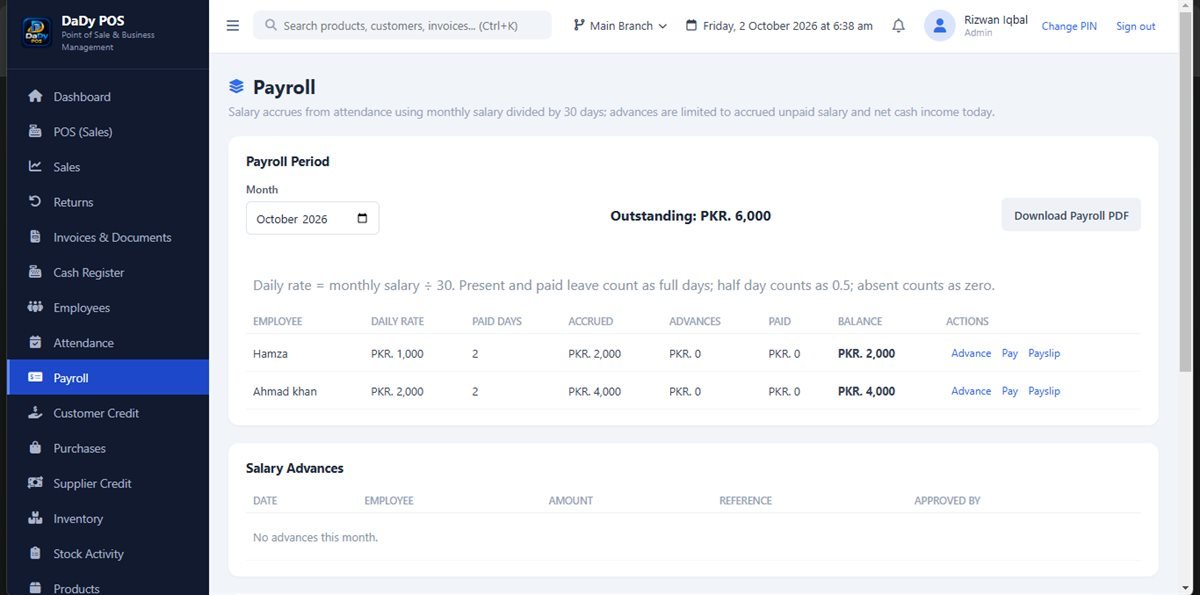
Treat payroll as a sensitive business process
Payroll touches people’s livelihoods and private information, so handle it with care. DaDy POS includes a payroll screen, but a screenshot alone cannot establish exactly what it calculates, which rules it applies, or whether it suits a particular employer. Ask the provider for a demonstration with sample figures and a clear explanation of every field before entering real employee data. Keep access limited to the owner or staff responsible for payroll. Careful shop payroll record keeping helps verify pay details while protecting employee privacy.
Begin with verified employee information
Payroll information should match the agreement and the records maintained by the shop. Confirm the employee identity, pay period, and agreed compensation details before entering them. If an employee’s terms change, document the change and update the information through the approved process. Do not leave an old value in place and try to compensate with an unexplained adjustment in a later period.
Understand attendance and pay as related records
DaDy POS also shows employee and attendance areas. Ask how those screens relate to payroll, if at all. Do not assume attendance entries automatically determine pay, overtime, leave, or deductions. Verify what is manually entered and how a figure is produced before relying on it. Keep a separate record of any agreement or approval that the screen does not capture.
Review a pay period deliberately
Before a payroll amount is finalized or paid, review the relevant employees, dates, and values against the shop’s records. Identify missing or duplicate entries and confirm who approved exceptions. If a payment is made, retain a receipt or other evidence according to the business process. Do not mark a payment as complete before it actually occurs.
Plan for a small team and changing shifts
Family-run shops may have informal working patterns, but compensation expectations should still be clear to the people involved. Agree who enters staff information, who checks payroll, and what happens when the owner is unavailable. Keep a handover of unresolved questions without broadcasting private details. When a person changes role or leaves, review the records and device access that relate to them.
Use reports as a prompt, not a legal conclusion
Payroll summaries can help the owner review what has been recorded, but a total is not a certificate of compliance or a complete accounting statement. Confirm its inputs and period, and compare it with actual payment evidence. If the result will be used in formal filings, employment decisions, or financial statements, check that purpose with a qualified professional.
Protect payroll data on an offline system
Offline operation can help a shop continue day-to-day work without relying on internet availability, but it does not automatically secure sensitive employee records. Protect the device from unauthorized access, ask about available user controls, and learn the provider’s advice on backups and recovery. Do not copy payroll details to personal messaging accounts or leave the screen open in the customer area.
Ask questions before choosing payroll software
Before purchase, request a demonstration using sample employee and pay-period information. Ask what the payroll screen calculates, what must be entered manually, how errors are corrected, and what records the shop should keep separately. The stated DaDy POS price is Rs 12,500 plus Rs 1,000 monthly; ask precisely what the recurring charge includes.
Explain pay details clearly to each employee
Employees should be able to understand what period a payroll record covers and how it relates to the arrangement they have with the shop. If a figure changes, explain the reason privately and allow the employee to ask questions. Do not point to a screen as the only explanation if the underlying calculation or adjustment is unclear.
Handle a correction before repeating the calculation
If payroll information is wrong, identify whether the issue is a person, period, attendance entry, or pay detail. Correct the source according to the demonstrated workflow and recheck the result. Do not create an unexplained extra amount in the next period to compensate for a prior error.
Set a regular owner review date
A fixed review date helps ensure payroll is not rushed at the last minute. Choose a time to confirm employee changes, period information, and payment evidence. If the owner will be away, decide who can answer questions and who must wait for approval.
Keep pay discussions private and documented
If an employee asks about a payroll entry, move the conversation away from customers and other staff. Review the relevant period and source information together, explain what is known, and agree on a next step if the answer is not immediate. Record a correction only after the facts are checked, and keep supporting information private. A calm, prompt response protects trust better than an unexplained change in a later payment. Store records through the shop's approved process and seek qualified employment or accounting advice when an issue involves a formal obligation. Do not ask the employee to rely solely on a screen figure they cannot understand.