
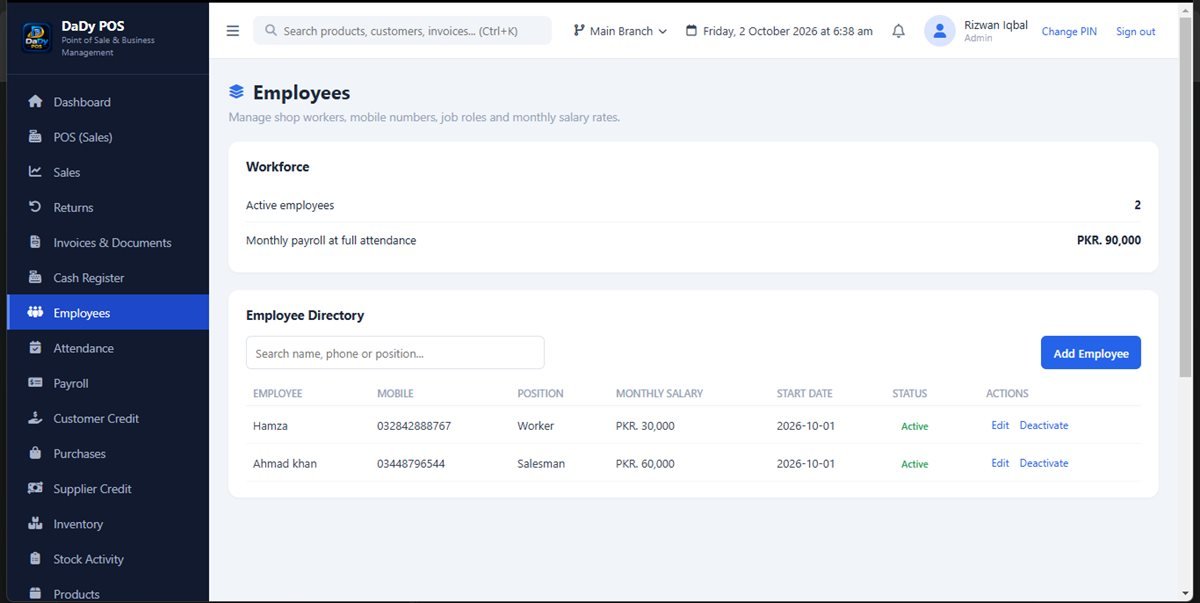
Keep employee records accurate and purposeful
The employees screen gives the shop a place to manage employee records in DaDy POS. Before entering staff details, decide what information is genuinely needed for your operations and who may see it. The screenshot does not establish every field or access control, so ask the provider to show what the installed version supports. Keep entries current through a deliberate process and avoid collecting personal data merely because a form makes it possible. Useful employee records for small shops keep current, role-appropriate information in one place.
Explain roles and responsibilities clearly
A staff record does not define what an employee is authorized to do. Agree which team members may record sales, manage returns, receive stock, enter expenses, or review reports. Explain who approves exceptions and how staff should ask for help. Make responsibilities clear before handing someone a device; otherwise different people may assume another person is checking the work.
Make shift handovers easy to understand
Small shops often rely on overlapping family and employee shifts. A useful handover says what remains unfinished, what customer or supplier needs attention, and what stock matter must not be forgotten. Keep it factual and brief. A sales entry left open, delivery awaiting count, or return held for inspection should be communicated to the next person rather than expected to appear obvious from the screen.
Connect attendance and payroll carefully
DaDy POS includes employee, attendance, and payroll screens in its wider interface. Ask the provider to explain exactly what each screen does and how data is entered before using it for staff administration. The presence of a payroll screen does not establish that the software calculates every deduction, entitlement, or legal obligation required in your situation. Confirm your responsibilities with a qualified professional or relevant authority where needed.
Respect staff privacy and access
Employee information is sensitive. Limit access to people responsible for the relevant shop work and ask how the data is protected in the installed system. Avoid leaving personnel or salary details visible to customers or sharing screenshots in informal chat groups. If an employee asks what information is stored, know who in the business can answer and how corrections are handled.
Create a fair, teachable onboarding routine
Show a new employee the sales workflow, what counts as a return, how to find a product, and when to call the owner. Demonstrate the difference between a purchase, expense, stock adjustment, and credit transaction. Ask them to practise using a sample or supervised scenario before handling a rush. These simple habits protect the employee too: clear instructions prevent avoidable mistakes from becoming personal disputes.
Review employee records as the team changes
When someone joins, changes responsibilities, or leaves, update the shop’s records and access arrangements promptly. Ask the provider how to preserve historic transactions while preventing unnecessary access. Do not delete a staff record without understanding whether it is linked to prior sales or other activity. Check that the right person remains responsible for reports and approval tasks after a change.
See how employee screens fit the whole system
For a useful demonstration, ask to see an employee record, a handover scenario, and the relationship between attendance and payroll. Then confirm how the staff member’s permissions relate to sales, expenses, and reports. The stated price for DaDy POS is Rs 12,500 plus Rs 1,000 monthly; ask what the fee includes and which staff workflows are covered.
Write down the shop's expectations for system use
Employees should know which person to ask when a sale needs correction, a customer requests credit, or stock differs from the shelf. A short orientation can prevent guesswork across several screens. Explain the limits of each role and how to hand off a task when the owner is not present.
Keep feedback about mistakes constructive
An incorrect entry should be corrected and used to improve the process. Ask what happened: was the product hard to identify, was the screen unfamiliar, or was the employee interrupted? Fix the immediate record using the supported process and then consider whether training or organization would prevent a repeat.
Plan access changes when staff responsibilities shift
When an employee changes duties or leaves, review who can use the shop device and access records. Ask the provider what actions are available and how historical transactions remain linked to the former staff member. Update shared instructions and pass responsibilities to a named person.
Give staff a clear route for raising questions
Employees should know where to take a question about a customer dispute, stock mismatch, or uncertain purchase instead of guessing at a screen. Name a responsible person for each shift and explain what to do if that person is unavailable. This is especially useful for newer staff who may not want to interrupt the owner during a busy period. Encourage them to report a mistake promptly and preserve any related receipt or note. A clear escalation path protects customers, employees, and the shop's records. Keep the procedure respectful and practical; staff management tools work best when the business has communicated expectations beyond the software.