
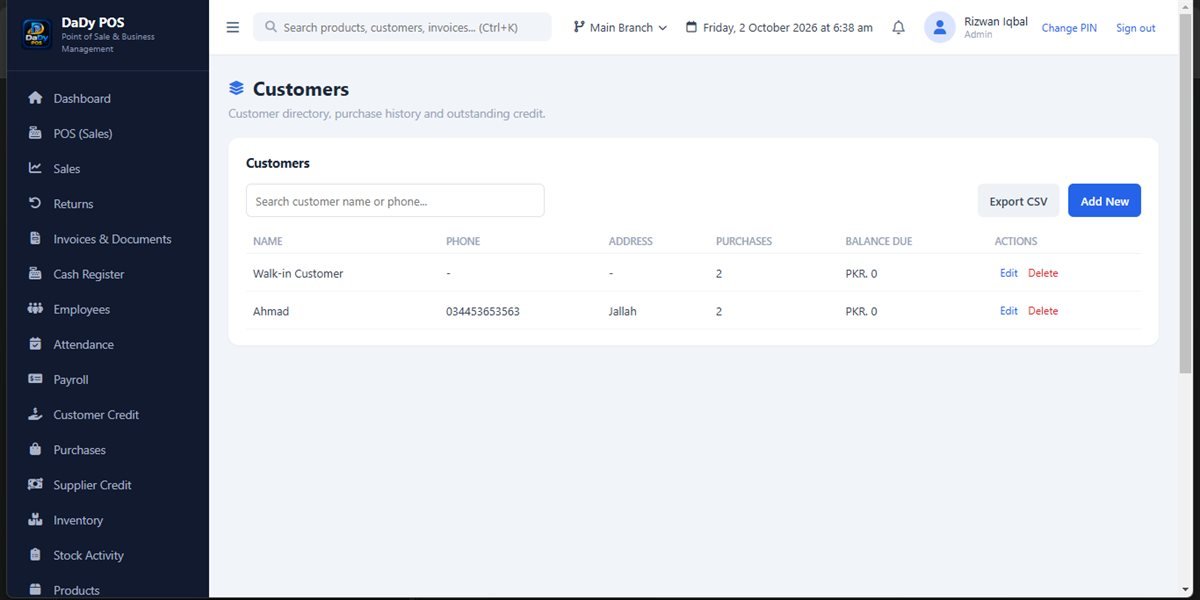
Create customer records for a clear reason
A customer list can help a shop identify people associated with a transaction or account. The customers screen in DaDy POS gives those records a place in the shop-management system. Before collecting information, ask what the business actually needs and how staff will use it. A familiar regular may be easy to recognize in person, but a list entry can help avoid confusion when several customers share a name or when a credit balance needs follow-up. Well-kept shop customer records contain only the details needed for service and appropriate follow-up.
Avoid duplicate and ambiguous entries
Before adding someone, search the existing customer list using the information the shop already has. Similar spellings, shortened names, and shared family contact details can create duplicate records. Agree on a consistent naming approach that helps staff distinguish customers without making entries intrusive. If an existing record may belong to someone else, pause and ask rather than guessing based on a familiar phone number or nickname.
Link records only when the customer is correctly identified
Customer information becomes important when connected to sales or credit. Confirm the customer before associating a transaction with their record. If a family member shops on another person’s behalf, follow the shop’s agreed procedure rather than assuming the account holder’s consent. Do not use a customer account simply because the person is a regular; accuracy and respectful handling go together.
Use a welcoming process at the counter
A registration request should feel clear, not like an unexpected interrogation. Tell customers why the shop is asking for a detail and whether it is required for the task at hand. Make sure staff can complete ordinary sales without inventing unnecessary registration steps. If the customer declines to share information, follow the shop’s policy and do not pressure them to provide details that are not needed.
Keep the list current without constant busywork
A customer list should remain useful, but there is no need to review every entry each day. Set a modest routine to correct obvious errors when staff encounter them and periodically look for duplicates. Decide who may make changes and how significant corrections are checked. This keeps the information relevant without turning counter service into an administrative task.
Help staff respect customer privacy
Make a simple rule about who may look up customer information and when. Do not announce a customer’s balance aloud in a queue, leave the screen visible to passers-by, or share account details among employees who have no role in the transaction. Ask the provider which access controls exist and whether accounts can be arranged for the people using the system.
Coordinate customer records with everyday shop tasks
The customer screen is only one part of the workflow. A sale can happen without being a credit transaction, and a customer record does not itself prove that a balance is owed. Returns, customer credit, sales, and transaction history all give separate views of activity. Demonstrate how a typical customer interaction moves through these screens before teaching staff the process.
Ask about setup and cost
DaDy POS is shop-management software with customer records and customer-credit screens. Before adopting it, ask for a demonstration of adding a record, finding an existing customer, correcting a detail, and reviewing a connected transaction. The stated price is Rs 12,500 plus Rs 1,000 monthly; clarify what the monthly charge covers and what privacy controls are available.
Be clear about the reason for a detail
If staff ask for a phone number or another identifier, they should be able to explain why the shop needs it. Customers are more comfortable when a request has a clear purpose and is not treated as compulsory when it is not. Follow the shop's policy consistently, and never write down sensitive information in a place visible to other shoppers.
Correct a record with the customer, not by assumption
If a customer says a name or contact detail is wrong, confirm the appropriate correction and update the existing record through the supported process. Avoid adding a second record because it is quicker. If the information is linked to a credit balance or prior transaction, take extra care and ask the owner to verify that history remains attached to the right person.
Keep a customer list from becoming a mailing list by accident
A customer record does not automatically mean the person agreed to receive messages or promotions. Do not use stored details for a new purpose without understanding the customer's expectations and the business's rules. Ask the provider whether any communication feature exists before claiming that it does, and establish a clear consent process if the shop later chooses to contact customers.
Use customer information only for the shop purpose
A name entered to locate a sale does not automatically authorize unrelated contact or promotion. If the business wants to use customer details for another purpose, first establish whether that use is appropriate and explain it honestly. Do not promise that the POS manages consent or messaging unless the provider has demonstrated a relevant feature. Keep staff instructions aligned with the reason information is collected, and avoid copying a customer list into personal phones or informal groups. If information appears inaccurate, verify the correction with the person or owner before changing it. Restraint helps preserve the trust that makes a small local shop relationship valuable.