ProjectionLab Review 2026: The Best DIY Retirement Planner? – ROB BERGER
ProjectionLab is retirement and financial planning software that lets you build a detailed model of your financial life and then stress-test it. You enter your accounts, income, expenses, and future plans, and it shows you whether your money lasts, when you can retire, and what happens if you change course along the way.
I have used just about every retirement calculator and planning tool out there. ProjectionLab is one of the few I keep coming back to. It hits a rare balance. It is powerful enough to model almost any situation, but it does not require a spreadsheet degree to use. This review walks through what it does, what has changed, what it costs, and who should use it.
ProjectionLab Review Summary
- What it is: Detailed DIY retirement and financial independence planning software.
- Best for: Hands-on planners, FIRE-minded savers, and anyone who wants to model taxes, withdrawals, and “what if” scenarios in depth.
- Not ideal for: People who want an app that auto-syncs every transaction and budgets for them. ProjectionLab is a planner, not a budgeting app.
- Price: Free version available. Premium is $129/year and Pro (for advisors) is $549/year, both billed annually. Each paid plan includes a 7-day free trial.
- My take: One of the best retirement planning tools available, and the one I recommend most often for people who like to run the numbers themselves.
What Is ProjectionLab?
ProjectionLab is financial planning software built for individuals who want to map out their financial future in detail. You enter where you are today and where you want to go. It projects your net worth, income, expenses, and taxes year by year, all the way through retirement and to the end of your plan.
The tool was created by Kyle Nolan (who I met, along with his team, at an industry conference) and first launched in April 2021. It is no longer the work-in-progress it was in its early days. After five years of steady development, it has grown into a mature, deep planning platform with a polished interface. It is updated regularly, and the pace of new features has been remarkable.
One thing that sets ProjectionLab apart is its approach to your data. It does not require you to link your bank and brokerage accounts. You enter your numbers manually, or update them on your own schedule. The company’s stance is simple. You are the customer, not the product. It does not sell your data or run ads. For a lot of people, that privacy trade-off is worth the small amount of extra effort.
Who Should Use ProjectionLab
ProjectionLab is a great fit if you:
- Like to run your own numbers instead of handing them to an advisor.
- Are planning for early retirement or financial independence.
- Want to model Roth conversions, withdrawal order, and tax strategy.
- Have a more complex situation, like a pension, rental property, or a working spouse with a different timeline.
- Care about privacy and would rather not link your accounts.
It is probably not the right tool if you:
How ProjectionLab Works
You can try ProjectionLab free without creating an account. The free Basic version lets you build a plan and run the core forecasting, Monte Carlo, and historical backtesting simulations. It does not save your data between sessions, and the more advanced tools, like cash-flow projections, tax optimization, withdrawal strategies, and estate planning, are reserved for Premium. To save your work and unlock the full feature set, you need a Premium subscription.
Building a plan follows a logical flow. Here is the short version.
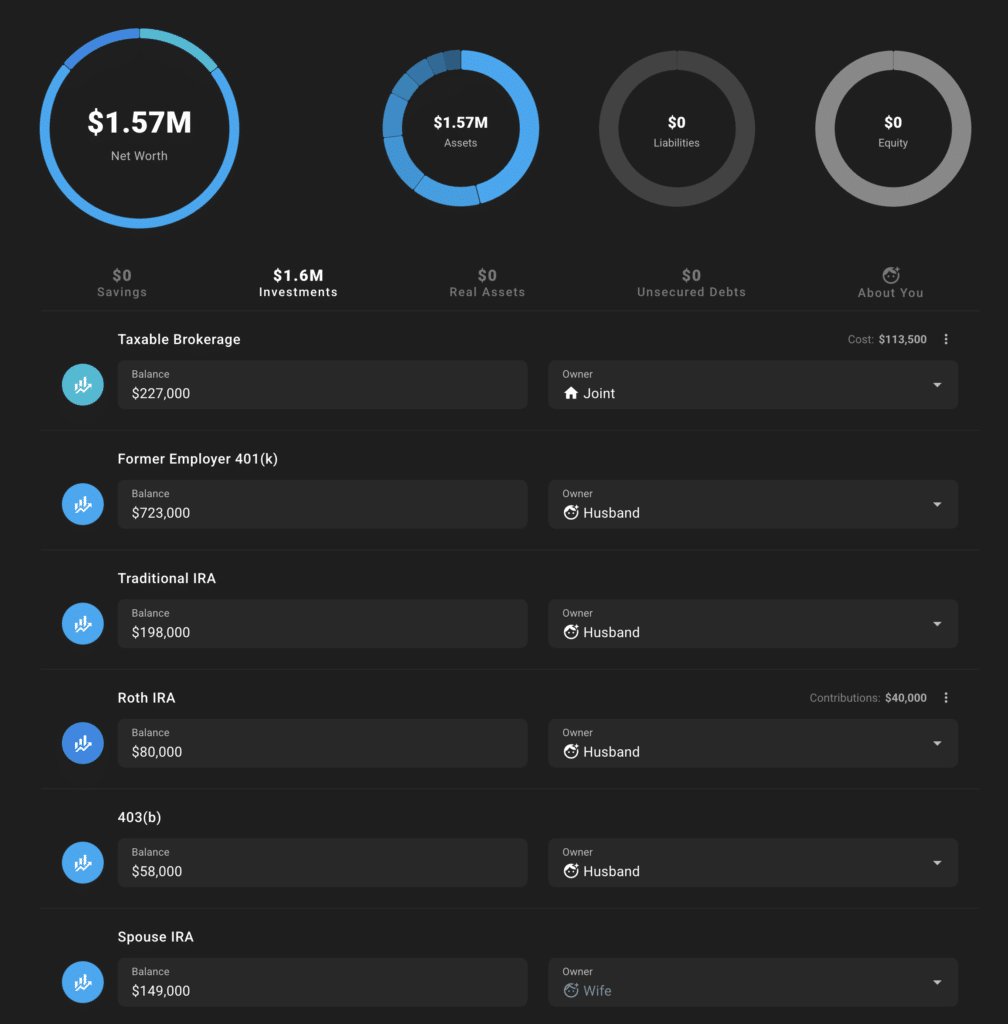
1. Add Your Accounts
You start by entering what you have today. That includes savings, taxable investments, retirement accounts, HSAs, 529 plans, real assets like your home, and even crypto. ProjectionLab now supports a wide range of specific US account types, including 401(k), 403(b), 401(a), 457(b), and the Roth versions of each. That level of detail matters when the tool later calculates taxes and required minimum distributions.
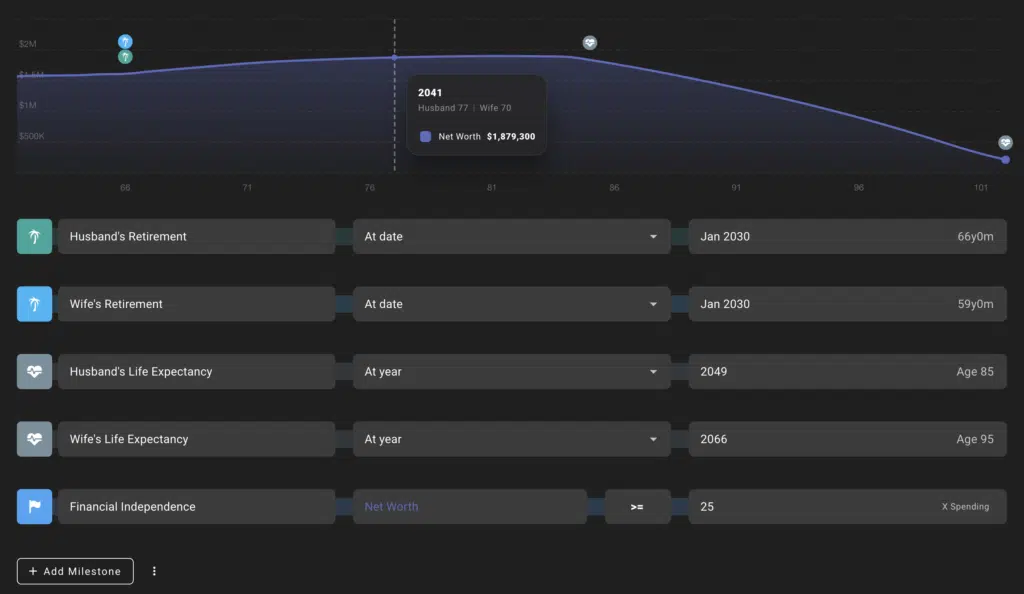
2. Set Your Milestones
Milestones are the big life events in your plan. Retiring, buying a home, having a child, relocating, or a spouse leaving the workforce. You set the age or year each one happens. This is where you define the shape of your journey to financial independence. You can add as many as you need and change them later.
3. Enter Income, Expenses, and Cash Flow
Next you add your income sources, from salary to a side hustle to Social Security to a pension, each with its own start and end date. Then you enter expenses. ProjectionLab lets you mark expenses as essential or discretionary, which becomes powerful later when you model flexible spending.
The Cash Flow section, which ProjectionLab now calls Flows, is where you decide the priority order for your money. Where do extra dollars go first? Paying down debt, filling an emergency fund, maxing a 401(k), then a taxable account. You set the rules and the tool follows them every year.
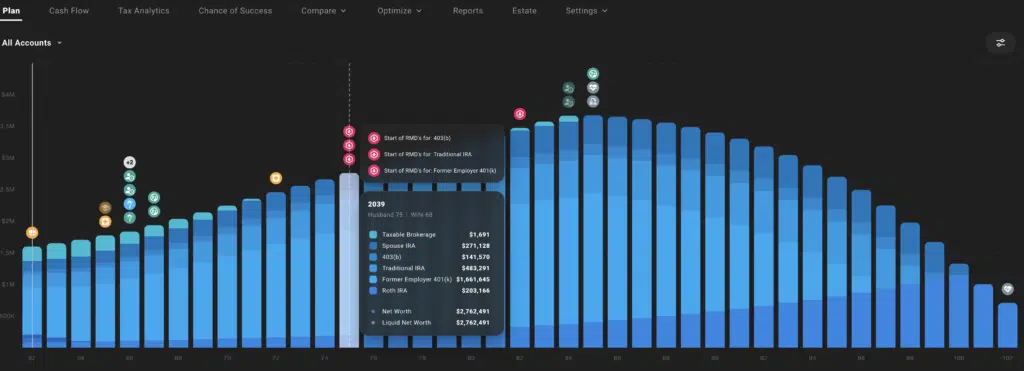
4. Review the Results
Once your inputs are in, ProjectionLab charts your financial future year by year. You see net worth, income, expenses, taxes, and withdrawals over time. From there you can change any assumption and watch the plan update instantly. This is the real value of the tool. It turns “I hope this works” into “here is what happens if it does not.”
ProjectionLab’s Key Features
This is where ProjectionLab has changed the most. What started as a clean projection tool is now a full planning suite. Here are the features that matter most.
A quick note on tiers: the free Basic plan covers forecasting, Monte Carlo simulations, and historical backtesting. The features tagged (Premium) below require a paid plan.
Chance of Success (Monte Carlo)
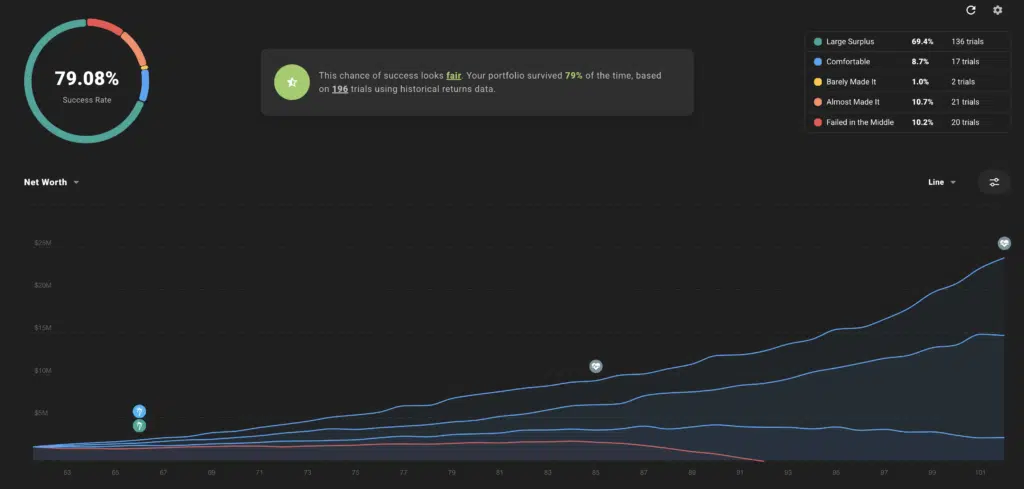
ProjectionLab runs your plan through thousands of simulated market scenarios and tells you the percentage that succeed, meaning you do not run out of money. It also offers historical backtesting, which runs your plan against real historical market sequences. A single success percentage makes it easy to compare one strategy against another. If you want to understand what that number really means, I wrote a full guide on decoding the chance of success in your retirement plan.
Cash Flow Visualization (Premium)
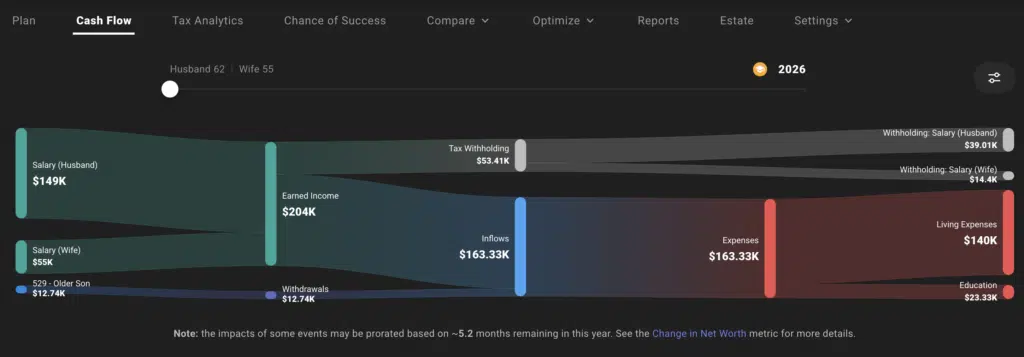
ProjectionLab includes a Sankey diagram that shows exactly how money flows through your plan in any given year. Income comes in on one side, and you can trace it out to taxes, expenses, and savings. It is one of the clearest ways I have seen to understand where your money actually goes.
Tax Planning and Optimization (Premium)
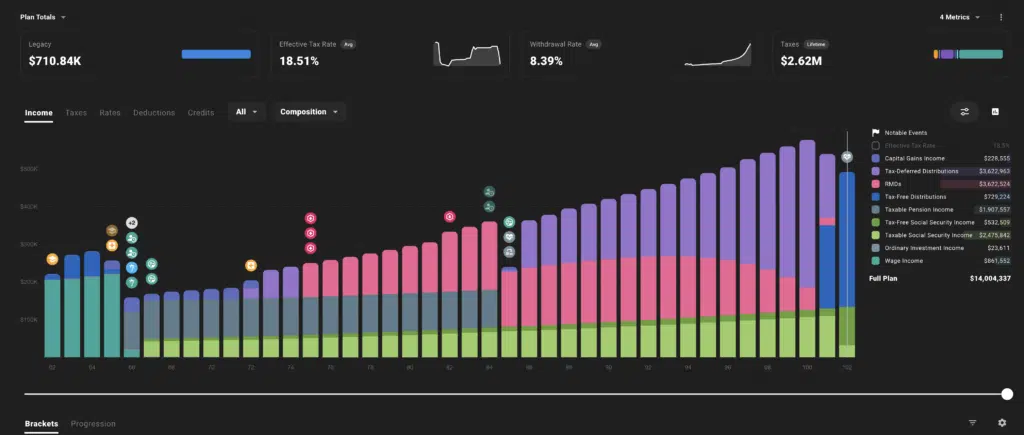
This is the single biggest upgrade since the early days. Tax planning went from a weak spot to one of ProjectionLab’s greatest strengths. The tool now models:
- Federal and state income taxes, with special handling for a number of cities and localities.
- Roth conversions, including an optimizer that targets specific tax brackets.
- IRMAA Medicare surcharge cliffs and ACA health insurance subsidy thresholds.
- Capital gains harvesting and tax-efficient withdrawal ordering.
- Recent tax law changes, including provisions from the 2025 tax legislation.
If you are trying to manage the tax hit in retirement, this is one of the few consumer tools that takes it seriously. For background on why this matters, see my article on tax-efficient retirement withdrawal strategies.
Withdrawal Strategies (Premium)
You can set the exact order in which you draw down accounts in retirement, such as cash first, then taxable, then tax-deferred, then Roth. ProjectionLab also supports different withdrawal methods beyond a fixed amount, including variable strategies that adjust spending based on how your portfolio performs. That flexibility lets you model real-world retirement spending, not just a straight line.
Estate Planning (Premium)
ProjectionLab added a full Estate tab. It estimates what you leave behind, models federal estate tax, and handles charitable giving strategies like Qualified Charitable Distributions and Donor-Advised Funds. If leaving a legacy is part of your plan, you can now see the after-tax number your heirs actually receive.
Compare and What-If Mode (Premium)
You can build multiple plans and lay them side by side. Retire at 60 versus 63. Pay off the mortgage versus invest. Compare mode overlays one plan on another so you can see the difference in net worth, taxes, and success rate at a glance. This is how you turn a vague decision into a clear one.
International Support (Premium)
ProjectionLab is no longer US-only. It now includes tax presets and account types for a growing list of countries, including Canada, the United Kingdom, Australia, the Netherlands, and Germany. If you are planning outside the US, it is one of the few tools that even attempts this level of detail.
ProjectionLab Pricing
ProjectionLab offers three tiers, all billed annually. There is no monthly plan and no lifetime option. Here is how they break down.
| Plan | Price | Who it is for |
|---|---|---|
| Basic | Free | Run forecasts, Monte Carlo simulations, and historical backtesting. Your data is not saved between sessions, and the advanced planning tools are locked. |
| Premium | $129/year | The plan most individuals want. Saves your data and unlocks cash-flow projections, tax optimization, withdrawal strategies, estate planning, Compare mode, international planning, and downloadable reports. |
| Pro | $549/year | Built for financial advisors and coaches. Includes a client dashboard and 10 client seats, with more available. |
What’s the Difference Between Basic and Premium?
The free Basic tier covers the core projection engine. Premium unlocks the planning depth that makes ProjectionLab special, especially the tax and withdrawal tools. Here is the side-by-side.
| Feature | Basic (Free) | Premium |
|---|---|---|
| Forecasting & net worth projections | Yes | Yes |
| Monte Carlo simulations | Yes | Yes |
| Historical backtesting | Yes | Yes |
| Flexible modeling | Yes | Yes |
| Save your data between sessions | No | Yes |
| Cash-flow projections (Sankey) | No | Yes |
| Tax optimization & estimation | No | Yes |
| Roth conversions & capital gains harvesting | No | Yes |
| Withdrawal strategies | No | Yes |
| Estate planning | No | Yes |
| Compare & What-If mode | No | Yes |
| Multiple plans | No | Yes |
| International planning | No | Yes |
| Downloadable reports | No | Yes |
For most people, Premium is the plan that makes sense. The free Basic tier is genuinely useful for kicking the tires, but without the advanced tools or the ability to save your work, it is impractical for real planning. Premium unlocks everything an individual planner needs. Both paid tiers include a 7-day free trial, so you can test the full feature set before you pay. If you cancel within those seven days, your card is not charged.
Pros and Cons
Pros
- Extremely flexible. You can model almost any financial situation.
- Deep, serious tax planning, including Roth conversions and bracket optimization.
- Clean, modern interface that is easier to use than the depth suggests.
- Strong privacy stance. No required account linking, no ads, no selling your data.
- Constantly improving, with frequent and meaningful updates.
- Free version and a free trial let you test before you commit.
Cons
- There is a learning curve. The depth that makes it powerful can feel like a lot at first.
- No automatic account syncing. Updating balances is a manual task by design.
- The free tier is limited. Most of the features that make ProjectionLab worth using require Premium.
- Paid plans are billed annually. There is no monthly option, so it is a bigger upfront commitment.
- Support is online only. There is no phone line, though you can reach help through Discord, email, and a contact form.
ProjectionLab Alternatives
ProjectionLab is excellent, but it is not the only option. Here is how it compares to the main alternatives.
- Boldin (formerly NewRetirement): The closest competitor. Boldin is also a deep DIY planning tool and leans a bit more toward guidance and education. ProjectionLab tends to win on interface and flexibility. Boldin offers account linking, which ProjectionLab does not.
- Empower: Free to use and great for tracking your net worth and portfolio in one place. Its retirement planner is far more basic than ProjectionLab, and it exists to steer you toward its paid wealth management service.
- Free retirement calculators: If ProjectionLab is more than you need, my roundup of the best retirement calculators covers simpler free options.
Frequently Asked Questions
Is ProjectionLab free?
There is a free Basic tier that covers forecasting, Monte Carlo simulations, and historical backtesting. It does not save your data between sessions, and the advanced tools, like cash-flow, taxes, withdrawals, estate planning, and Compare mode, require Premium. To save your work and unlock the full feature set, you need a Premium subscription at $129 per year.
Does ProjectionLab connect to my bank accounts?
No, and that is by design. ProjectionLab does not require you to link your financial accounts. You enter and update your numbers manually. This is part of its privacy-first approach. You are the customer, not the product.
Is ProjectionLab good for early retirement or FIRE?
Yes. It is one of the most popular tools in the FIRE community, and for good reason. Its flexibility with milestones, withdrawal strategies, and multiple scenarios makes it well suited to modeling an early or non-traditional retirement.
Who is ProjectionLab best for?
Hands-on planners who want to run their own numbers in detail. If you enjoy exploring scenarios and want serious control over taxes and withdrawals, it is hard to beat. If you want something that budgets for you automatically, a budgeting app is a better fit.
What support does ProjectionLab offer?
Support is online. You can get help through an active Discord community, email, and a contact form. ProjectionLab also offers optional paid one-on-one help, a 60-minute video call for $250, if you want someone to walk through your plan with you.
Final Verdict
ProjectionLab has grown from a promising newcomer into one of the best financial planning tools available for people who like to do it themselves. The depth of its tax planning, the flexibility of its scenarios, and its privacy-first approach put it near the top of the category.
It is not for everyone. If you want an app that tracks your spending automatically, this is not it. But if you want to truly understand your financial future and test the decisions that shape it, ProjectionLab is worth every penny of the $129 a year. Start with the free version, and if it clicks, the free trial on Premium lets you explore everything before you pay.