Here’s my Honest Review of the SwitchBot Standing Circulator Fan
Generally, it’s my colleagues who break stories about a new fan launch or put together a guide to the best cooling options for every budget. But when SwitchBot sent us its Standing Circulator Fan for review, it landed on my task list instead. That is not because I’ve been following SwitchBot since its inception, or because I claim to know fans better than the others. It’s because since the SwitchBot’s new circulator fan arrived, we have been inseparable. And thus this hands-on review.
SwitchBot Circulator Fan converts from a desk fan to a full-height tower, but having received it, I was curious whether it could replace the old mechanical Havells fan I have been babying for years. After spending a good two months with it, here’s my honest, hands-on take.

What’s in the Box
One thing I appreciate about SwitchBot is how carefully it packages everything, whether that’s a $99 retrofit motorized device or a $999 vacuum cleaner. The Standing Circulator Fan shipped no differently. What took me by surprise is that the box looked far too small to contain a standing fan. That was because it arrived disassembled into a handful of parts. This included: the weighted base, the fan head, two screw-in extension poles, a circular remote, and a power cable that doubles as the charging cord for the built-in battery.
Unlike the SwitchBot S10 installation that I struggled with, putting the SwitchBot Circulator Fan together turned out to be the easy part. My colleague Vatsal helped me set it up, and it took no longer than three minutes to put the whole unit together.
Modular and Portable


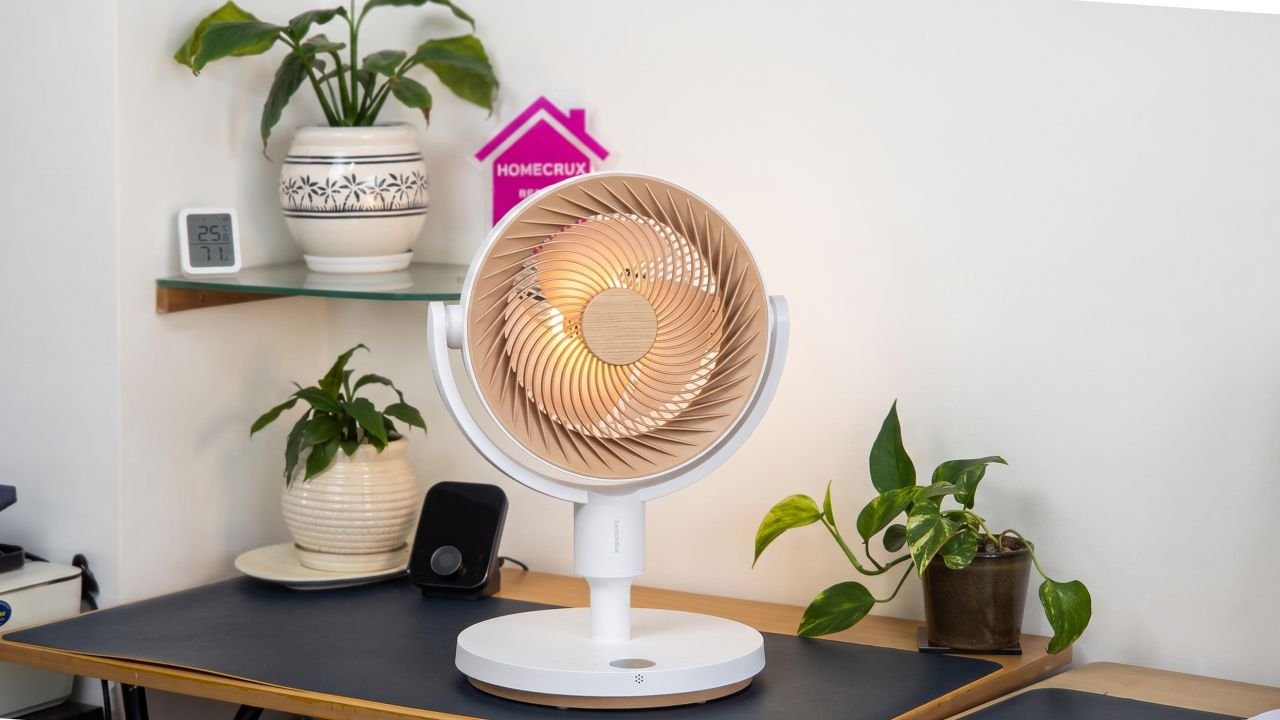
The poles thread directly into the base, and the fan head clicks on top. Depending on how many extension sections you use, the fan can sit as a compact desktop unit, a knee-height fan, or a full 39.37-inch standing fan. I appreciate that SwitchBot built in this flexibility instead of forcing buyers to choose between separate desk and floor models.
The build feels solid. It uses ABS plastic with a faux wood finish on the fan head, similar to SwitchBot’s Air Purifier Table. It looks good enough for a living room, though its remote feels a bit cheap. We will get to that bit later. What sold me on this fan is the cordless angle. SwitchBot Circulator Fan has a 2400mAh battery built into the base, so I’ve carried it from desk to desk without looking for a socket. During monsoon power cuts, it has become my go-to appliance, helping me stay cool.
Another USP of the fan is oscillation. The fan boast 90-degrees of horizontal sweep and roughly 100 degrees of vertical tilt. To put that into context, the fan head can point straight at me or angle upward to push hot air down from the ceiling. The vertical tilt was especially useful during the recent heat, since most fans only swing side to side and ignore the heat pooling near the ceiling. The fan also features a built-in night light. It runs independently of the fan, so you can leave it glowing through the night without the motor on, and on its softest setting, it’s genuinely pleasant as a bedroom night light.
Combined, speed, mode, oscillation, timer, and night light can all be operated via physical buttons on the base. All these features are present in the puck-shaped remote, which sticks magnetically to the back of the fan when not in use. That magnetic dock might sound like a small touch, but it solved the one problem I have with every other remote in my house: losing it under the sofa.

Quiet When it Needs to be, Strong When it Doesn’t
SwitchBot has built its entire marketing campaign around this fan being quiet, and the product actually walks the talk. It’s built around a DC brushless motor with what the company calls SilenTech, and the noise figures back that up. There are four operating modes: Standard speed mode, Natural mode, Sleep mode, and Baby mode.
Since this fan finds its home in my office rather than at home, I haven’t been able to test the different use cases directly, but based on other reviews I’ve read, Sleep mode works well for most nights, and Baby mode has been useful during power cuts when I needed something quiet running on battery. The Verge measured noise as 50 dB when running at max speed, and 28dB on the barely audible Baby preset. The noise climbs steadily as one pushes it up through the multi-speed settings, reaching a still-tolerable level even on the highest setting, where the airflow turns strong for a fan this size.
Airflow at close range is strong, and SwitchBot claims the fan can circulate the air in a bedroom in about three minutes at higher speeds. If you’re after a fan that floods an entire room evenly, this isn’t quite that. If you want focused, strong cooling exactly where you point it, this delivers.
Smart Features and the Hub
The SwitchBot app gives you more control than the physical buttons. You can fine-tune speed from 1 to 100 percent instead of just the nine presets, set the exact oscillation range, or schedule the fan to turn on or off at specific times. The SwitchBot Circulator Fan supports Matter, but only once it’s paired with a SwitchBot Hub. I don’t use Apple Home myself, so I haven’t tested that side of it. The fan can also be voice-controlled through Alexa and Google Assistant when paired with one of SwitchBot’s Matter-compatible hubs. I have yet to test that part too.

Battery Life and Charging
SwitchBot informs, the battery can last up to 28 hours in Baby mode and around 12-13 hours in Sleep or low Natural settings. I would still say it’s a bit of an exaggeration, considering I ran it at full speed with oscillation, which dropped the battery to about two hours. This is why I would recommend running it at moderate speed. When it comes to charging, one can use the included cable or any USB-C source.

Pricing and Value
The SwitchBot Standing Circulator Fan is priced at $95, though it’s worth keeping an eye on SwitchBot’s own BF 2026 sale and Amazon listings, where it may drop to anything between $65 and $80 when Black Friday rolls around in the next three months. I know, summer is here right now, so a deal month away doesn’t help you today. But if you are short on budget and want an affordable, quieter fan on your radar for next year, this one deserves a spot on your list.
What I Liked
- Useful Battery Backup
- 3D Oscillation
- Whisper-Quiet Baby and Sleep modes
- Modular Height Options
What I Didn’t Like
- Full smart home control needs a separate SwitchBot Hub
- Airflow has a narrow sweet spot rather than filling the whole room evenly
The Bottom Line
The SwitchBot Standing Circulator Fan has earned a permanent spot next to my desk since it arrived. It’s so good, literally and figuratively cool, that my colleagues keep taking turns at it throughout the day, which says more about the quality. The cordless freedom alone makes it worth considering over a standard pedestal fan, and the modular height options mean it replaces two or three single-purpose fans I would otherwise need around the home or office.
That said, the hub requirement for full Matter control is a real downside if you’re not already in SwitchBot’s ecosystem. But for everyday cooling, with a reliable battery that lasts during power cuts, this is the fan I keep reaching for over my old one.